Equipment fleet management software for construction
Each machine has a QR code linked to its record: where it is, who has it, its condition on return and whether it is compliant.
A tracked fleet, but not a connected one
A fleet of 50 to 2,000 machines quickly ends up spread across several systems. The ERP holds the billing data. The spreadsheet holds the locations. The documents are elsewhere. Each of those tools is correct within its own scope.
What is missing is the link. Getting a complete view of one machine — where it is, who had it, the condition it came back in and whether it is compliant — means assembling four answers held in four places. That joining up is what TraviXO takes on.
The fleet: one record per machine, accessible by scanning
QR code tracking
A unique code for each item, generated in bulk and ready to print on standard adhesive labels. Scanning it opens the equipment record.
Scan from a phone
There is no app to install. Scanning works through the camera and a recent mobile browser.
Fleet dashboard
An immediate view of the fleet, filterable by status, depot, category or custom fields. Track utilisation rates by category.
Import your existing file
Upload your equipment file as it is. Errors are identified before import, with a preview before confirmation.
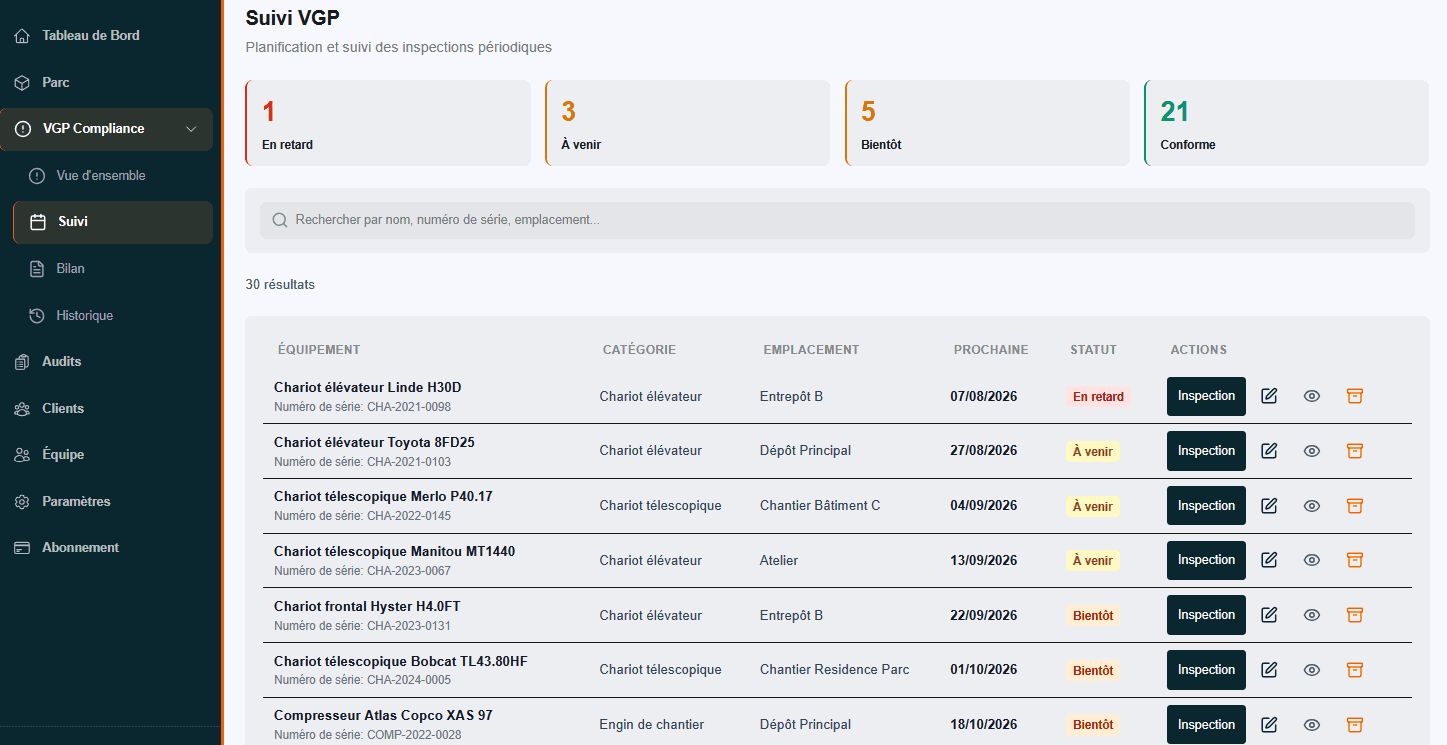
Every machine, its category and its next due date
Filter the fleet by status, category and location, with the next due date for each item.
Movements: what the fleet becomes once it moves
A fleet is not a fixed inventory. Machines go out, change depot, go to site, and come back in a different condition from the one they left in.
Each scan writes a dated event: who checked the machine out, when, with what notes, and the condition it was taken back in. End to end, those events form the machine's history, readable from its record. The same chain feeds compliance: the inspection due date follows the machine rather than a spreadsheet row kept alongside it.
The exceptions you need to see straight away
- Expected return not scanned. A machine was due back yesterday evening, but no return was scanned. The alert is sent the following morning.
- Equipment missing after a stocktake. The depot stocktake is complete and two items are missing. The list is automatically sent as a PDF.
- Inspection due soon for a machine on hire. The machine is with a customer and its due date is approaching. The reminder is sent early enough to arrange its return.
Compliance attached to the equipment
Periodic general inspections fall under article R.4323-23 of the French Code du travail, which refers to ministerial orders for the intervals: twelve months as the general rule for lifting equipment, six months for the categories listed in section II of article 20 of the arrêté du 1er mars 2004, and three months in certain cases.
Across a fleet split between several depots, the difficulty is not knowing those intervals but holding them machine by machine. Each item carries its own due date, and the fleet can be filtered on what is coming up.
Compressors and generators are part of the fleet vocabulary but fall under inspection regimes other than those two orders. TraviXO tracks them as equipment without applying a lifting-equipment inspection interval that does not apply to them.
TraviXO does not replace your ERP
It connects what your ERP does not: the physical machine, its compliance status, its documents and its traceability in the field. It does not depend on any particular ERP, and you do not need to change your existing tools.
Pricing
179 € per month, 100 assets included and unlimited users. VAT not applicable, art. 293 B of the French tax code. Above 100 assets the rate tapers, and the product is designed for fleets of 50 to 2,000 machines.
View pricingFrequently asked questions
How many items of equipment can you track?
The product is designed for fleets of 50 to 2,000 machines. Above 2,000 assets, pricing is on quote.
Do you need to install an app?
No. Scanning works from a recent mobile browser, with nothing to install.
What if our existing file is poorly maintained?
The import handles imperfect data. Columns are recognised even when their headings are inconsistent, and errors are flagged before confirmation.
Are compressors and generators tracked?
Yes, as fleet equipment: record, QR code, location, movements and documents. No lifting-equipment inspection interval is applied to them, however: they fall under inspection regimes other than the arrêté du 1er mars 2004 and the arrêté du 5 mars 1993.
Can you export the data?
Yes. Export data in CSV or Excel format from the dashboard, and inspection reports as PDFs.
Do we need to give up our ERP?
No. TraviXO sits alongside it, without depending on any particular ERP.
- Rental business? The complete chain, from check-out to return. View the page