Equipment rental software: the proof leaves with the machine
Equipment goes out to the customer. Its documents, its recorded condition and its next inspection date go with it, and come back with it. Check-out, return, dispute: the answer is already on record.
Compliance is a custody problem, not a calendar problem
A due date in a spreadsheet can be watched. A machine at a customer site is harder to watch: it left in one condition, it comes back in another, and in between nobody has hold of it.
That is where the two problems meet. The commercial dispute and the compliance gap come from the same moment: when the machine changed hands, nothing was recorded. When a customer disputes damage, a return date or the condition it left in, the discussion comes down to what you can show. And if the machine went out without its latest inspection report, the problem is no longer merely commercial.
The fleet: what can go out, and what cannot
Before the rental, you need to know what you have. Each item carries a record and a QR code, and its status says whether it can go out today.
One record per machine
Name, category, serial number, location, status. The record opens by scanning the QR code, from any phone, with no app to install.
Your existing file as the starting point
The fleet imports from the file you keep today. Columns are recognised even when headings are inconsistent, and errors are flagged before confirmation.
The due date carried by the machine
The inspection interval is attached to the machine, not to a spreadsheet row kept alongside it. What is approaching its due date shows up on the fleet view.
Status before check-out
Available, on hire, in maintenance. You know what can be committed to an order before promising it to a customer.
The rental: three scans, one timeline
The handover is the moment that counts. Each scan writes a dated event, and those events end to end are the machine's timeline.
Sent out to the customer
When equipment leaves the depot, a scan creates a timestamped event: who checked it out, when and with what notes.
Return with condition recorded
On return, a second scan records the condition of the equipment, with notes and photos where needed. The difference between the condition it left in and the condition it came back in is documented as it is observed.
The complete history
Each item shows who had it, for what period, its condition on return, and where its next inspection stands.
Compliance: what has to travel with the machine
For second-hand lifting equipment let out on hire, the arrêté du 1er mars 2004 does not only require inspections to be up to date. It requires the documents to be physically present on the machine or nearby.
A cet effet, il doit être placé sur l'appareil, ou à défaut à proximité, avec la notice d'instructions, les copies des rapports de vérification de première mise en service et de la dernière vérification périodique ainsi que l'historique des vérifications périodiques effectuées.
Arrêté du 1er mars 2004, article 15-II
Four items, then: the instruction manual, the initial commissioning inspection report, the latest periodic inspection report and the inspection history. The same article also provides that the head of the using establishment confirms with the rental company that those inspections were carried out. Your customer has a regulatory reason to ask you for this pack.
TraviXO attaches these documents to the machine and makes them reachable by scanning the QR code. The pack builds up as inspections happen, instead of being assembled at the moment someone asks for it.
Who is responsible for inspections during the hire period
The rental company must have kept periodic inspections up to date since the machine was first hired out, and provide the machine with the reports and history mentioned above. As the employer, the user company remains responsible for arranging the inspections of its work equipment (article R.4323-23 du Code du travail).
Those inspections are carried out by a qualified person, whether or not they belong to the establishment (article R.4323-24). As a general rule that text does not require an accredited body; some categories of equipment are nonetheless subject to their own requirements.
In practice this means two things for a rental company: being able to produce a machine's document status when it leaves, and knowing at any time which machines currently on hire are approaching their due date.
The proof: what the person scanning sees
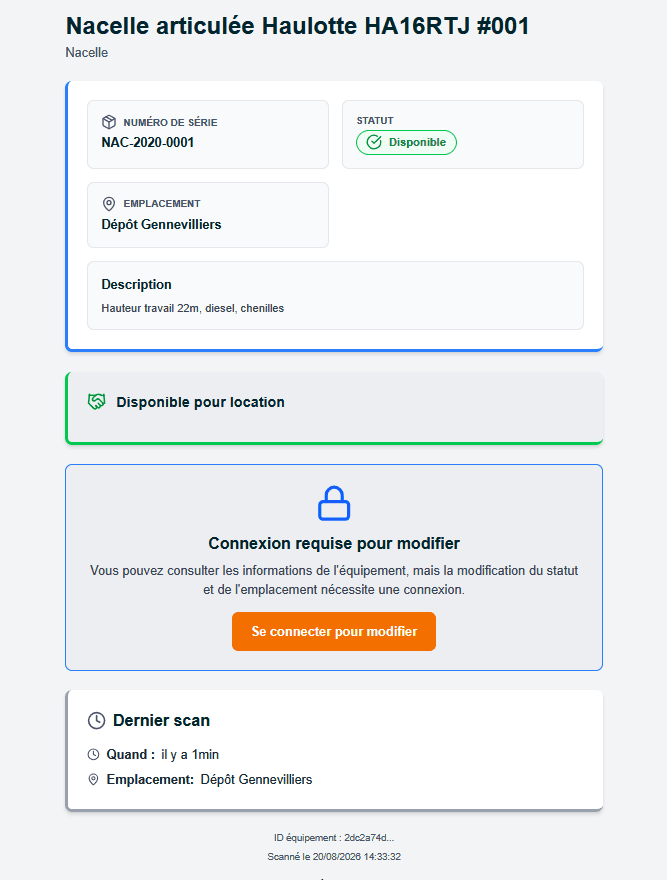
The QR code opens the machine record without an account: identity, location, status and latest scan. Purchase prices are not shown, and signing in is required to make any changes.
An inspection falling due during a hire
This is the case spreadsheet tracking handles badly, because it requires joining two things kept separately: the inspection date and the machine's rental situation.
- The cross-check is done for you. TraviXO matches due dates against active rentals. A machine still with a customer whose date is approaching surfaces without anyone having to compare two files.
- The alert arrives early enough to act on. The reminder comes with room to arrange the return and schedule the inspection, rather than once the date has already passed.
- The date conflict is flagged. When you schedule the inspection, the application compares the due date with the expected return date and flags cases where the inspection falls due first. You can then recall the machine or arrange an on-site visit.
TraviXO does not replace your ERP
Your ERP knows the contract and the billing. It does not usually know the condition the machine came back in, or where its latest inspection report is filed. TraviXO links the physical machine to its rentals, its movements, its documents and its compliance, without depending on any particular ERP and without changing your existing tools.
Pricing
179 € per month, 100 assets included and unlimited users. VAT not applicable, art. 293 B of the French tax code. VGP management is part of the product, at no extra cost. Above 100 assets the rate tapers.
View pricingFrequently asked questions
How are check-out and return documented?
With one scan at check-out and another on return. Each scan records the operator, timestamp, notes and observed condition.
Can photos be added on return?
Yes. Notes and photos can be attached to the return event.
Which documents have to accompany a machine on hire?
For second-hand lifting equipment let out on hire, article 15-II of the arrêté du 1er mars 2004 requires the following to be placed on the machine or nearby: the instruction manual, the initial commissioning inspection report, the latest periodic inspection report and the inspection history. Other categories of equipment fall under different regimes.
What happens if an inspection is due soon for a machine on hire?
A reminder is sent early enough to arrange the return and schedule the inspection. When you schedule it, the application compares the due date with the expected return date and flags cases where the inspection falls due first. You can then recall the machine or arrange an on-site visit.
What does a customer see when they scan the QR code without an account?
The machine record: name, category, serial number, location, status and description, plus the date and location of the latest scan. Purchase prices and book values are never shown. Signing in is required to change the status or location.
Do the machines need tracking devices?
No. Tracking uses QR codes printed on standard adhesive labels, not onboard hardware.
- The same system seen across the complete fleet. View the page